Vítejte v průvodci Climbing.Place!
Ať už jste horolezec, který chce přihlásit svůj nejnovější projekt, nebo majitel lezecké stěny, který přenáší své lezecké stěny do digitálního věku, tento průvodce vám přesně ukáže, jak z naší platformy vytěžit maximum.
Část 1: Pro horolezce
Navigace v interaktivní nástěnné mapě
Když navštívíte profil lezecké stěny, nemusíte procházet nekonečnými seznamy textů, abyste našli svou trasu. Pokud má lezecká stěna zmapované stěny, zobrazí se interaktivní mapa lezecké stěny.
- Klepněte nebo najeďte myší na libovolný barevný sektor na plánu.
- Mapa vám řekne název zdi (např. „Převis“, „Slab Wall“).
- Klikněte na sektor a stránka vás plynule posune přímo dolů k trasám pro konkrétní zeď!
Procházení tras
Uvnitř každého sektoru uvidíte seznam aktivních tras spolu s jejich barvou, nastavením, obtížností a průměrným hodnocením komunity.
- To save your phone's battery and data, we load the first batch of routes only. Just tap "Load more routes" at the bottom of the table to see the rest!
- Chcete vidět, co si myslí ostatní horolezci? Klepnutím kamkoli na řádek trasy okamžitě rozbalíte panel Climber Reviews a přečtěte si nejnovější beta verzi.
Zaznamenání vašeho výstupu
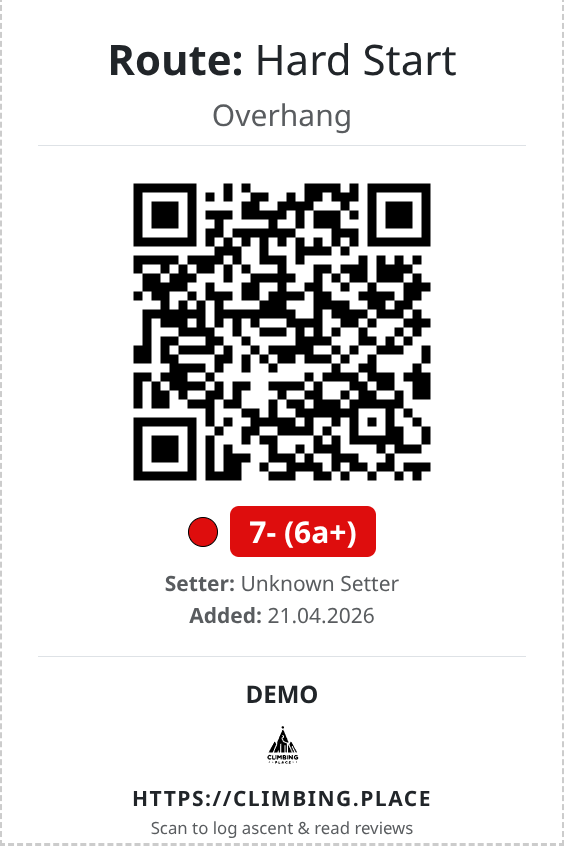
Naskenujte QR kód na začátku trasy a okamžitě otevřete stránku Podrobnosti trasy. Odtud můžete zaznamenat své odeslání!
- Přihlásit se: Abyste mohli sledovat své výstupy, musíte být přihlášeni.
- Styl výstupu: Viděl jsi to? Flash to? Nebo konečně získat Redpoint? Vyberte si svůj styl, abyste mohli sledovat svůj pokrok!
- Navrhněte známku: Pokud se domníváte, že seter cestu pískoval (nebo vám připadal trochu měkký), navrhněte stupeň.
- Opustit beta verzi: Napište komentář, který pomůže dalšímu lezci ven, a zanechte hodnocení 1 až 5 hvězdiček.
Část 2: Pro majitele a manažery horolezeckých posiloven
Vyžádejte si svou lezeckou stěnu
Je vaše lezecká stěna uvedena, ale nemáte přístup k úpravě?
- Přejděte na veřejný profil své lezecké stěny.
- Přejděte dolů a klikněte na velké žluté tlačítko „Claim this Climbing Gym“.
- Vyplňte svůj kontaktní e-mail, WhatsApp/Telegram a svou pozici v lezecké stěně. Poskytněte rychlou ověřovací zprávu, aby náš tým mohl potvrdit, že tam pracujete.
- Po schválení odemknete řídicí panel!
Řídicí panel
Po ověření se vám zobrazí tlačítko „Spravovat lezeckou stěnu“. Kliknutím na toto otevře váš Owner Dashboard – vaše centrální řídicí centrum. Odtud máte přístup ke všemu, co potřebujete pro provoz vašeho zařízení.
Nastavení otevírací doby
Informujte své lezce o tom, kdy mohou trénovat.
- Klikněte na dlaždici Otevírací doba.
- Otevírací a zavírací časy pro každý den v týdnu můžete nastavit na jediné obrazovce.
- Potřebujete zavřít kvůli dovolené nebo soutěži? Stačí pro daný den zaškrtnout políčko „Zavřeno“.
Správa cen a vstupenek
Transparentní ceny pomáhají horolezcům plánovat jejich návštěvy.
- Klikněte na dlaždici Ceny a vstupenky.
- Přidejte vstupní poplatky, půjčovny (postroj, boty) a členství.
- Můžete určit, zda se cena vztahuje na určitou věkovou skupinu (např. „Studenti“, „U18“), zda se jedná pouze o víkendy, nebo dokonce nastavit časy Happy Hour!
Kreslení rozvržení stěny (sektory)
Pomozte lezcům orientovat se ve vaší lezecké stěně kreslením interaktivních sektorů přes váš půdorys.
- Přejděte na Upravit rozvržení.
- Pomocí nástroje plátno obkreslete tvary (polygony) přes různé části stěny.
- Každému sektoru přiřaďte název a odlišnou barvu. Tím se automaticky vygeneruje interaktivní mapa na vašem veřejném profilu!
Správa tras a tisk QR kódů
Tady se děje kouzlo.
- Kliknutím na Spravovat trasy přidáte nová stoupání do svých aktivních sektorů.
- Přiřaďte trase barvu, nastavení a obtížnost.
- Systém automaticky vygeneruje unikátní QR hash pro trasu. Tyto QR kódy si můžete vytisknout a nalepit na startovní chyty, aby horolezci mohli své výstupy okamžitě skenovat a zaznamenávat!
Potřebujete pomoc?
Pokud narazíte na nějaké problémy, narazíte na chybu nebo máte požadavek na funkci, obraťte se na náš tým podpory na adrese contact page!

Najděte svůj další projekt s naší rozsáhlou databází cest a problémů s boulderingem. Vyhledávejte podle umístění,…